
We build coordinated 3D models from your drawings so your team can visualize the project, catch conflicts early, and extract reliable quantities.
Introduction to BIM
From 2D drawings to an information-rich model
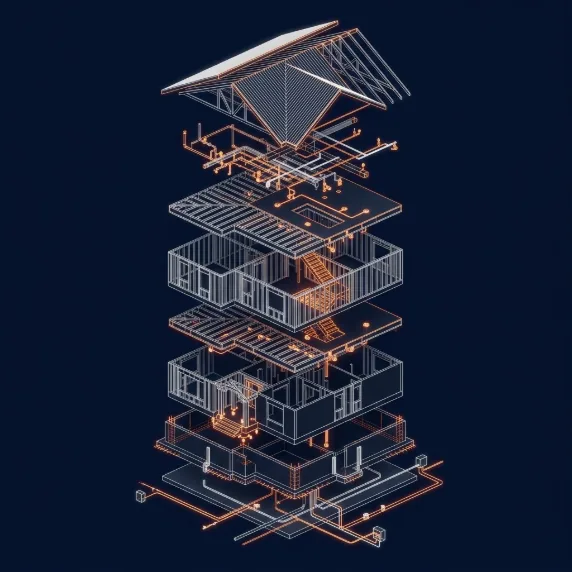
Building Information Modeling (BIM) creates a digital model of a building in which every wall, beam, duct, and pipe is an object with real dimensions and properties. Instead of interpreting separate plan, section, and detail sheets, teams can see how everything fits together.
For contractors, that means fewer surprises. Overlapping systems are visible before fabrication, quantities can be extracted directly from the model, and owners can review the design in 3D.
Verton develops models in Autodesk Revit from your architectural, structural, and MEP drawings, to the level of development your project calls for.
2D & 3D capabilities
Modeling services
Models are built in Revit from your drawings, to the level of development your project requires.
Architectural modeling
Walls, floors, roofs, doors, windows, and finishes modeled from design drawings.
Structural modeling
Foundations, columns, beams, slabs, and framing for coordination and quantities.
MEP modeling
Ductwork, piping, plumbing, electrical, and fire protection systems in 3D.
Clash detection
Coordination reviews that identify conflicts between disciplines, with a clash report.
Scan-to-BIM
Existing-condition models built from point-cloud data you provide.
2D documentation from models
Plans, sections, and elevations generated from the coordinated model.
Model-based quantities
Schedules and quantity exports that feed estimating.
Visualization
3D views and walkthrough-ready models for owner and team review.
Coordination & visualization
Resolve conflicts on screen, not on site
Coordinated models help teams find clashes between ducts, pipes, structure, and architecture before fabrication and installation.
Fewer field conflicts
Find duct, pipe, and structure clashes before installation, when changes are cheapest.
Shared understanding
Owners, designers, and trades review the same 3D model instead of interpreting 2D sheets.
Quantities from the model
Element schedules give a consistent source for takeoffs and budget checks.
Better documentation
Sheets generated from the model stay consistent as the design changes.
Modeling workflow
How a model comes together
A structured workflow keeps the model aligned with your drawings and your team informed at each milestone.
- 01
Receive drawings
We review your drawings, specifications, and any existing models or scan data.
- 02
Set standards
We agree on level of development, naming, templates, and deliverable formats.
- 03
Build the model
Architecture, structure, and MEP are modeled discipline by discipline.
- 04
Coordinate & check
Clash detection and internal review resolve conflicts and gaps.
- 05
Deliver & support
You receive the model, reports, and sheets, plus help with follow-up questions.
Possible deliverables
What you can receive
Deliverables are agreed in your proposal. These are examples of what BIM projects commonly include.
Native Revit model (RVT)
The full model in Revit for your team or consultants.
IFC export
Open-format model for coordination in other platforms.
Clash report
Clashes grouped by system and location with views.
Quantity schedules
Element schedules exported to Excel for estimating.
2D sheet set
Plans, sections, and elevations generated from the model.
3D views
Exported views and images for presentations and reviews.
Levels of development
LOD 200
Approximate geometry for early design studies, massing, and conceptual budgets.
LOD 300
Accurate size, shape, and location for coordination and construction documents.
LOD 350
Adds connections and interfaces between systems for detailed coordination.
Project types
Where BIM adds the most value
Modeling is most useful where systems are dense, schedules are tight, or the owner needs a model at handover.
- Commercial offices
- Healthcare and labs
- Multifamily residential
- Hotels and hospitality
- Schools and institutional
- Industrial and warehouses
- Renovations with scan data
- MEP-dense mechanical rooms
Images on this page are illustrative visualizations and do not depict specific Verton client projects.
BIM FAQs
What software do you use for BIM?
We model in Autodesk Revit and can export to IFC for use in other coordination platforms. If your project requires a specific version or template, let us know in your request.
What level of development (LOD) can you model to?
Typical projects are modeled to LOD 200, 300, or 350 depending on the purpose. We confirm the LOD for each discipline in the proposal.
Do you need CAD files, or are PDFs enough?
PDFs are enough for most projects. CAD files speed up modeling and improve accuracy when available.
Can you perform clash detection on models from other consultants?
Yes. Send the models in RVT or IFC format and we can run coordination reviews and provide a clash report.
Can the model be used for estimating?
Yes. Element schedules and quantity exports can feed directly into our estimating process or your own.
Start a project
Have drawings that need a model?
Send your plans and tell us what the model is for: coordination, visualization, quantities, or handover. We will recommend a scope and level of development.